Follow the steps to reset:
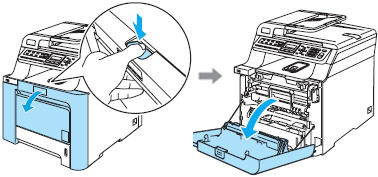
STEP 1- Open the front cover of your Brother MFC-7820Nor Brother MFC-7420so you can access the toner cartridge.
STEP 2- While the front cover is open and the machine is on, push the button "Options".
STEP 3- Push "Start"
STEP 4- Then Quickly type
"1″ and "0″(like your typing
the number 10).
If you don't perform this step quick enough
you will have to start from the beginning.
Don't ask why, we don't know and could not
find an answer to that question even from
Brother. We think they just like aggravating
people.
STEP 5- Wait until the machine show's the term "Accepted" in the window.
STEP 6- There is no step 6, your TN-350 toner cartridgeis now reset and you can now print to your heart's content.