Change Drum Soon MFC 9700 9800 Why does my Brother MFC still display CHANGE DRUM SOON
For HL Models:1 - Open the front cover
2 - Locate the control panel [ BUTTON ] under the led lights
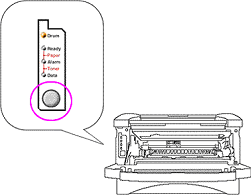
3 - Press the control panel button until all the lights are lit the release the button. The drum counter is now reset.
4 - Close the door. You are ready to print.
For MFC Models
1 - Open the front cover and press the [ CLEAR ] button.
2 - The screen will ask if a
"New Drum Was Installed"
" 1 for Yes 2 for No"
3 - Press the [ 1 ] key to select yes.
4 - The scree should respond with "selection accepted"
5 - The drum counter is now reset. Close the door. You are ready to print
- Brother MFC-1260
- Brother MFC-1270
- Brother MFC-2500
- Brother MFC-P2500
- Brother MFC-8300
- Brother MFC-8500
- Brother MFC-8600
- Brother MFC-8700
- Brother MFC-9600
- Brother MFC-9650
- Brother MFC-9700
- Brother MFC-9750
- Brother MFC-9800
- Brother MFC-9850
- Brother MFC-9870
- Brother HL-1030
- Brother HL-1230
- Brother HL-1240
- Brother HL-1250
- Brother HL-1270n
- Brother HL-1435
- Brother HL-1440
- Brother HL-1450
- Brother HL-1470n
- Brother HL-P2500
- Brother Intellifax 4100
- Brother Intellifax 4100e
- Brother Intellifax 4750e
- Brother Intellifax 4750p
- Brother Intellifax 5750e
- Brother Intellifax 5750p
- Brother DCP-1200
- Brother DCP-1400
- Brother FAX 8350p
- Brother FAX 8750p
- Pitney Bowes Laser 1630
- Brother Intellifax 4750
- Brother Intellifax 5750
- Brother Intellifax 8500
- Brother Intellifax 8500p